# I Didn't Draw a Single Line

2026-10-02 · Jacek Becela · https://jacekbecela.com/blog/omarchy-p-bloom-theme/

> A theme for Omarchy with 42 wallpapers of machines from a future worth building, and a music video.

1. [Why I made it](#why-i-made-it)
2. [What's inside](#whats-inside)
3. [Install it](#install-it)
4. [Pencils down](#pencils-down)

## Why I made it

p(bloom) is a theme for [Omarchy](https://omarchy.org) with 42 wallpapers of
machines from a future worth building. The look is inspired by Bungie's Destiny. I've always
loved its vision of future technology: machines that harness the Light. I
wanted my desktop to feel like that, full of inventions I'd love to see come
true. I'm betting on bloom.

Making it was pure joy. Every finished piece showed me three new things to
try, and the horizon only kept getting wider.

I made the song for the music video in Suno, and I haven't had this much fun
in a long time. It feels like imagining straight into music: I can steer the
song however I want, from the broad strokes down to the smallest details.
Forty-six versions fell by the wayside, and I wrote about forty-five notes
along the way. Two made it, one electronic and one rock, because I grew up on
rock and metal as much as on electronic music, and I still love both.

## What's inside

**42 blueprint wallpapers.** Every machine is a 3D model, drawn as a
blueprint with notes and diagrams. They are full of detail but stay quiet
behind your windows, and when you have a minute, you can wander around one and
find something new. Each sheet also lists what still has to be invented before
the machine can be built: a to-do list for the future.

<figure class="inside-figure">
<img src="https://jacekbecela.com/draft-assets/destiny/caption-tether-climber.webp?v=2" alt="The legend of Tether Climber, a space elevator cargo car: it climbs a ribbon from an ocean platform to geostationary orbit on beamed laser power; it needs materials science, photonics, photovoltaics and orbit control; projected first service 2075." width="1137" height="580" loading="lazy" />
<figcaption>Tether Climber, a space elevator car: what it needs, and when it might first run.</figcaption>
</figure>

**The theme.** Everything Omarchy can theme gets deep-space navy, ice-white
text and nine colours named for moods.

<div class="destiny-palette" aria-label="The p(bloom) palette">
<span style="--swatch:#4cc9ff">Signal<small>#4cc9ff</small></span><span style="--swatch:#b97aff">Bloom<small>#b97aff</small></span><span style="--swatch:#ff8a3d">Sunrise<small>#ff8a3d</small></span><span style="--swatch:#f5c945">Pollen<small>#f5c945</small></span><span style="--swatch:#3ddc97">Sprout<small>#3ddc97</small></span><span style="--swatch:#4fe3d0">Lagoon<small>#4fe3d0</small></span><span style="--swatch:#ff5468">Flare<small>#ff5468</small></span><span style="--swatch:#5b8dff">Horizon<small>#5b8dff</small></span><span style="--swatch:#c19a5b">Brass<small>#c19a5b</small></span>
</div>

**Made for your screen.** Each wallpaper is composed again for every common
screen, from 1080p to 7680 × 2160. A sharper screen gets finer lines and
captions, not a stretched picture. A different shape gets its own layout: on a
21:9 ultrawide, a cropped 16:9 picture would lose the title and the notes, so
everything is arranged again to fit.

<figure class="compare-figure">
<p class="compare-title"><strong>Resolution</strong></p>
<div class="compare" style="--pos:50%;aspect-ratio:1400/788">
<img class="compare-after" src="https://jacekbecela.com/draft-assets/destiny/cmp-res-native.webp?v=3" alt="The same area from the native 5K image: every line and caption is sharp." width="1400" height="788" loading="lazy" />
<img class="compare-before" src="https://jacekbecela.com/draft-assets/destiny/cmp-res-stretched.webp?v=3" alt="Fusion Transport on a 5K screen from a 1080p image stretched to fit: lines and captions are soft and faint." width="1400" height="788" loading="lazy" />
<span class="compare-label compare-label-left">1080p image, stretched</span><span class="compare-label compare-label-right">Native 5K</span>
<span class="compare-handle" aria-hidden="true"></span>
<input class="compare-range" type="range" min="0" max="100" value="50" step="0.5" aria-label="Move the divider: 1080p image, stretched on the left, Native 5K on the right" />
</div>
<figcaption>Part of a 5K screen. Drag the line.</figcaption>
</figure>

<figure class="compare-figure wide">
<p class="compare-title"><strong>Composition</strong></p>
<div class="compare" style="--pos:50%;aspect-ratio:2400/1013">
<img class="compare-after" src="https://jacekbecela.com/draft-assets/destiny/cmp-comp-composed.webp?v=2" alt="The same screen with the wallpaper composed for 21:9: everything fits, with room around it." width="2400" height="1013" loading="lazy" />
<img class="compare-before" src="https://jacekbecela.com/draft-assets/destiny/cmp-comp-cropped.webp?v=2" alt="Fusion Transport on a 21:9 screen when the 16:9 wallpaper is cropped to fill it: the title block, the notes and the emblem are cut off at the bottom." width="2400" height="1013" loading="lazy" />
<span class="compare-label compare-label-left">16:9, cropped to fit</span><span class="compare-label compare-label-right">Composed for 21:9</span>
<span class="compare-handle" aria-hidden="true"></span>
<input class="compare-range" type="range" min="0" max="100" value="50" step="0.5" aria-label="Move the divider: 16:9, cropped to fit on the left, Composed for 21:9 on the right" />
</div>
<figcaption>A 21:9 ultrawide screen. Drag the line.</figcaption>
</figure>

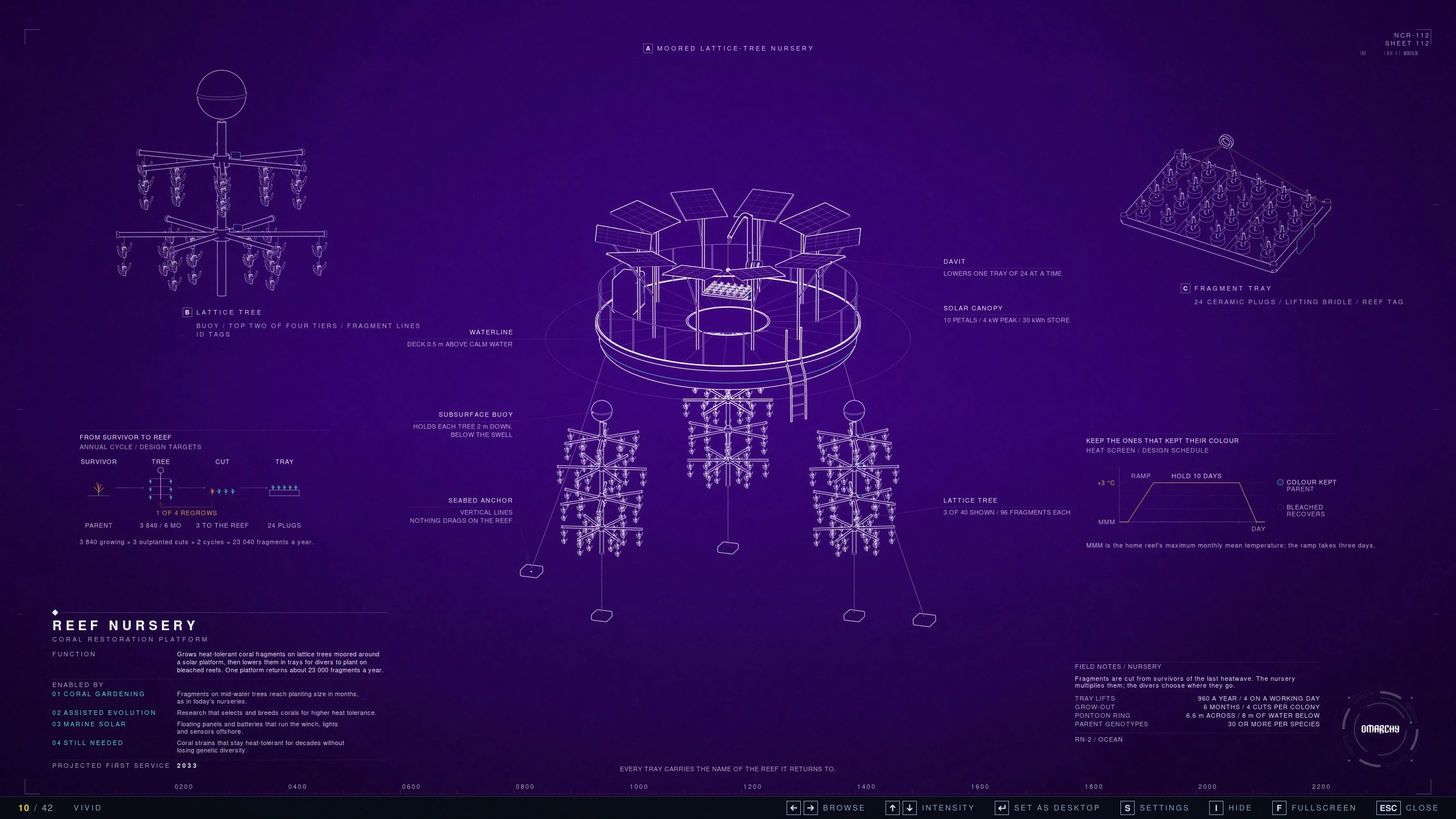
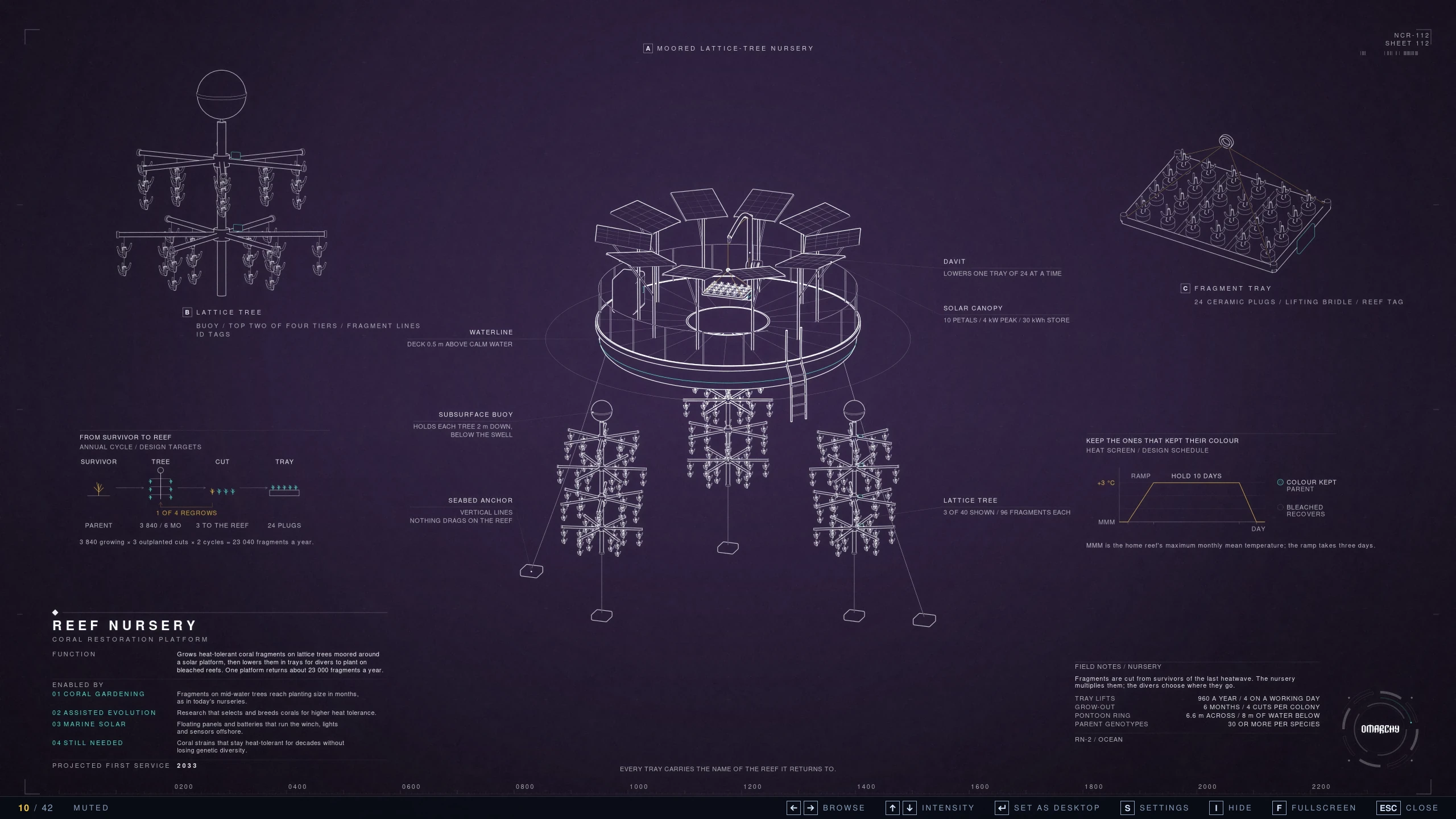
**p(bloom) Wallpapers.** The companion app is a gallery drawn like the sheets:
← → browse, ↑ ↓ show the same wallpaper at another intensity, Enter puts it on
your desktop. In the background it picks the set that fits your monitors,
downloads only that one, and switches when you plug in another screen. The
theme carries one set, 16:9 at 5K, about 26 MB. All 18 screen shapes and sizes
at three intensities would take about 690 MB, so the app downloads the rest
on demand, only the files it doesn't have yet. It can also fetch all three
intensities of your set at once.

<figure class="compare-figure">
<p class="compare-title"><strong>Intensity</strong></p>
<div class="compare" style="--pos:50%;aspect-ratio:2560/1440">
<img class="compare-after" src="https://jacekbecela.com/draft-assets/destiny/gallery-reef-vivid.webp" alt="Reef Nursery in the p(bloom) Wallpapers gallery, Vivid: a saturated violet ground; the strip along the bottom shows 10 / 42, VIVID and the keys." width="2560" height="1440" loading="lazy" />
<img class="compare-before" src="https://jacekbecela.com/draft-assets/destiny/gallery-reef-muted.webp" alt="Reef Nursery in the p(bloom) Wallpapers gallery, Muted: a dark, greyed violet ground; the strip along the bottom shows 10 / 42, MUTED and the keys." width="2560" height="1440" loading="lazy" />
<span class="compare-label compare-label-left">Muted</span><span class="compare-label compare-label-right">Vivid</span>
<span class="compare-handle" aria-hidden="true"></span>
<input class="compare-range" type="range" min="0" max="100" value="50" step="0.5" aria-label="Move the divider: Muted on the left, Vivid on the right" />
</div>
<figcaption>Reef Nursery in the gallery, ↑ and ↓. Drag the line.</figcaption>
</figure>

**Room for a see-through bar.** I always wanted to use Omarchy's see-through
bar, but on most wallpapers the details behind it made it useless. So the top
edge of every wallpaper is plain paper, with no lines or labels. Double-click
the bar and it stays perfectly readable.

<figure class="compare-figure wide">
<div class="compare compare-bottom" style="--pos:50%;aspect-ratio:1060/200">
<img class="compare-after" src="https://jacekbecela.com/draft-assets/destiny/bar-clear.webp" alt="Omarchy's bar made see-through over Spin Table: the clock and the icons sit on plain paper." width="2120" height="400" loading="lazy" />
<img class="compare-before" src="https://jacekbecela.com/draft-assets/destiny/bar-solid.webp" alt="Omarchy's bar with its dark background over the top of Spin Table." width="2120" height="400" loading="lazy" />
<span class="compare-label compare-label-left">With background</span><span class="compare-label compare-label-right">See-through</span>
<span class="compare-handle" aria-hidden="true"></span>
<input class="compare-range" type="range" min="0" max="100" value="50" step="0.5" aria-label="Move the divider: the bar with its background on the left, see-through on the right" />
</div>
<figcaption>My own bar, over Spin Table. Drag the line.</figcaption>
</figure>

**Next: a wallpaper for each screen.** Omarchy shows one wallpaper on all
screens, so a laptop next to an ultrawide gets one picture for two shapes
and two resolutions. The sets for both already exist; Omarchy only needs to
show each screen its own, and I'm planning a pull request for that.

## Install it

One line in a terminal:

```bash
omarchy theme install https://github.com/ncr/omarchy-p-bloom-theme.git
```

Then the companion app, once:

```bash
python3 ~/.config/omarchy/themes/p-bloom/companion/install.py
```

To open it, press <kbd>Super</kbd> + <kbd>Space</kbd>, type `pbloom` and press
<kbd>Enter</kbd>:

<p class="app-launch"><img src="https://jacekbecela.com/draft-assets/destiny/p-bloom-wallpapers-128.png" srcset="/draft-assets/destiny/p-bloom-wallpapers-128.png 2x, /draft-assets/destiny/p-bloom-wallpapers-256.png 4x" width="64" height="64" alt="The p(bloom) Wallpapers icon: p( ) in thin type with a yellow flower between the parentheses, on magenta, framed by the sheets' corner marks." /><span>p(bloom) Wallpapers</span></p>

## Pencils down

Who made p(bloom), me or the AI? I didn't draw a single line, write any code
or play a note. Agents did all of that, and they did it well.

But making something is more than producing it: it is deciding what it should
be. Nobody asks whether the camera made the film; the director chooses what
ends up on screen. Here I made about 465 of those decisions:

- **Wallpapers:** 149 machines drafted, 42 kept, about 125 decisions.
- **Music:** 48 songs generated, 2 kept, about 45 decisions.
- **Video:** 60 cuts, 2 kept, about 130 decisions.
- **The app:** 5 settings screens, 1 kept, about 35 decisions.
- **This post:** 59 drafts, 1 published, about 130 decisions.

Each one is a note I wrote down: “too static”, “that's not how I write”,
“this dome could never close”.

Agents can make almost anything, and fast.
Deciding what is worth keeping, and what is still wrong, stays my job. Taste
isn't knowing what's beautiful. It's noticing, for the 465th time, that
something isn't yet.

Not everything needs 465 decisions. A one-shot, a single prompt shared as it
came out, is less mine, but it still counts: someone sees it, tries it and
takes it further. Sprouts like that are how most things start. Some of them grow into a
tree in bloom.

<p class="closer">Every line was drawn by an agent.<br />Every decision was <em>mine.</em></p>

<p class="signoff">p(bloom) >> p(doom)</p>